Category Archives: Uncategorized

Categories Uncategorized

Email Subject Line Generator for Marketing & Sales

Email Subject Line Generator

Email Subject Line Generator

Create high-impact email subject lines that get opened.

Email Subject Line Generator

Write High-Converting Email Subject Lines in Seconds

Your email subject line decides whether your email gets opened or ignored. Even the best email content won’t perform if the subject line doesn’t grab attention. Our Email Subject Line Generator helps you create engaging, click-worthy, and high-converting subject lines instantly.

Perfect for marketers, business owners, and anyone who wants better email open rates.


What Is an Email Subject Line?

An email subject line is the headline of your email. It’s the first thing recipients see in their inbox and plays a critical role in email performance.

A strong subject line helps you:

  • Increase email open rates

  • Capture attention in crowded inboxes

  • Communicate value instantly

  • Improve email marketing ROI

  • Encourage engagement and clicks

Small changes in subject lines can create big results.


Why Email Subject Lines Matter

People receive dozens (or hundreds) of emails every day. Your subject line must stand out. Optimized subject lines help you:

  • Get more opens without increasing send volume

  • Improve click-through rates

  • Reduce email fatigue

  • Boost conversions from campaigns

  • Strengthen brand recognition

Great subject lines are a mix of clarity, curiosity, and relevance.


What This Email Subject Line Generator Does

Our Email Subject Line Generator creates ready-to-use subject line ideas based on your topic, goal, and tone.

With this tool, you can:

  • Generate multiple subject line ideas instantly

  • Write subject lines for sales, newsletters, and promotions

  • Match different tones (professional, friendly, urgent, creative)

  • Save time on brainstorming

  • Improve open rates with proven formats

No more staring at a blank screen.


Key Features of the Email Subject Line Generator

✍️ High-Converting Subject Line Ideas

Get subject lines designed to grab attention and drive opens.

🎯 Purpose-Driven Suggestions

Create subject lines for promotions, announcements, follow-ups, cold emails, and newsletters.

⚡ Fast & Easy to Use

Enter your topic and generate subject lines in seconds.

🔁 Multiple Variations

Choose from different styles and angles to test what works best.

📧 Inbox-Friendly Length

Generate subject lines that display well across devices and email clients.


Who Should Use This Tool?

The Email Subject Line Generator is perfect for:

  • Email marketers

  • Business owners

  • Sales professionals

  • Bloggers & content creators

  • Freelancers & agencies

  • E-commerce brands

If email is part of your growth strategy, this tool is essential.


How to Use the Email Subject Line Generator

  1. Enter your email topic or campaign goal

  2. Select your tone or intent (optional)

  3. Click Generate Subject Lines

  4. Choose the best option

  5. Use it in your email campaign

You’ll have better subject lines in seconds.


Best Practices for Writing Email Subject Lines

To get the best results:

  • Keep subject lines between 6–10 words

  • Focus on value, not just promotion

  • Avoid spam-trigger words

  • Create curiosity without being misleading

  • Personalize when possible

Strong subject lines lead to stronger campaigns.


Common Email Subject Line Mistakes to Avoid

  • Using clickbait that doesn’t match the email

  • Writing subject lines that are too long

  • Overusing emojis or ALL CAPS

  • Being too vague or generic

  • Repeating the same subject line style

This tool helps you avoid these mistakes effortlessly.


Frequently Asked Questions (FAQs)

What is an email subject line generator?

An email subject line generator creates optimized subject line ideas designed to improve email open rates and engagement.


Do better subject lines really increase open rates?

Yes. Subject lines are one of the biggest factors influencing whether an email is opened.


Is this email subject line generator free?

Yes. The tool is easy to use and accessible without subscriptions.


Can I use these subject lines for marketing emails?

Absolutely. They work for newsletters, promotions, cold emails, follow-ups, and announcements.


Are the subject lines mobile-friendly?

Yes. The generated subject lines are designed to display well on mobile and desktop inboxes.


Can beginners use this tool?

Yes. It’s beginner-friendly and useful for professionals alike.


Start Writing Better Subject Lines Today

Stop guessing what will get opened.
Use our Email Subject Line Generator to create compelling subject lines that increase open rates and improve email performance.

👉 Enter your topic above and generate subject lines now.

Categories Uncategorized

Landing Page Analyzer – Improve Conversions & SEO

Landing Page Analyzer

Landing Page Analyzer

Analyze your landing page for SEO, UX, and conversion optimization.

Landing Page Analyzer

Analyze, Optimize & Improve Your Landing Page Performance

A landing page has one job: convert visitors into leads or customers. If it’s not performing, something is broken. Our Landing Page Analyzer helps you evaluate your landing page and identify optimization issues that hurt conversions, SEO, and user experience.

With one analysis, you’ll know exactly what to improve.


What Is a Landing Page Analyzer?

A landing page analyzer evaluates the design, content, SEO, and conversion elements of a landing page to measure its effectiveness.

It helps you understand:

  • Why visitors leave without converting

  • Whether your message matches user intent

  • How clear your call-to-action is

  • SEO and performance weaknesses

  • UX and trust issues affecting conversions

Data-backed insights lead to better results.


Why Landing Page Optimization Matters

Even small landing page issues can cause big conversion losses. Optimizing landing pages helps you:

  • Increase conversion rates

  • Improve SEO performance

  • Reduce bounce rate

  • Improve page speed and usability

  • Maximize ROI from ads and traffic

A well-optimized landing page turns traffic into revenue.


What This Landing Page Analyzer Does

Our Landing Page Analyzer scans your page and highlights issues that impact performance and conversions.

With this tool, you can:

  • Analyze page structure and layout

  • Evaluate headlines and messaging

  • Check call-to-action clarity

  • Review SEO elements and page content

  • Identify UX and performance issues

It provides clear, actionable recommendations — not just scores.


Key Features of the Landing Page Analyzer

📊 Conversion-Focused Analysis

Evaluate how well your page encourages users to take action.

📝 Content & Messaging Review

Check headline clarity, content relevance, and value proposition.

🎯 CTA Effectiveness Check

Analyze call-to-action placement, clarity, and visibility.

⚡ Performance & Speed Signals

Identify loading or usability issues that affect conversions.

🔍 SEO & Structure Insights

Review on-page SEO elements and search optimization factors.


Who Should Use This Tool?

The Landing Page Analyzer is perfect for:

  • Digital marketers

  • Business owners

  • SEO professionals & agencies

  • Advertisers running paid campaigns

  • SaaS companies

  • Startups & entrepreneurs

If you rely on landing pages to generate leads or sales, this tool is essential.


How to Use the Landing Page Analyzer

  1. Enter your landing page URL

  2. Click Analyze Landing Page

  3. Review performance insights

  4. Identify optimization opportunities

  5. Improve and test your page

No technical skills required.


How Landing Page Analysis Improves Results

Analyzing your landing page helps you:

  • Align messaging with visitor intent

  • Improve trust and credibility

  • Reduce friction in user journey

  • Increase form submissions or sales

  • Improve SEO and quality score

Better landing pages mean better ROI.


Common Landing Page Issues Found

  • Weak or unclear headlines

  • Poor CTA placement

  • Too much or too little content

  • Slow loading speed

  • Lack of trust signals

  • Poor mobile optimization

This tool helps uncover these problems quickly.


Best Practices for High-Converting Landing Pages

  • Clear and benefit-driven headlines

  • One focused goal per page

  • Strong, visible call-to-action

  • Fast loading speed

  • Mobile-friendly design

  • Social proof and trust signals

Use this analyzer to validate these elements.


Frequently Asked Questions (FAQs)

What is a landing page analyzer?

A landing page analyzer evaluates a page’s design, content, SEO, and conversion elements to identify areas for improvement.


Does landing page optimization help SEO?

Yes. Better UX, faster speed, and optimized content improve engagement and SEO performance.


Is this landing page analyzer free?

Yes. The tool is designed to be fast, simple, and accessible without subscriptions.


Can beginners use this tool?

Absolutely. The insights are clear and easy to understand for beginners and professionals.


Can this tool help with paid ads?

Yes. Optimized landing pages improve ad quality scores and conversion rates.


How often should I analyze a landing page?

You should analyze landing pages regularly, especially after design, content, or traffic changes.


Analyze Your Landing Page Today

Stop guessing why your landing page isn’t converting.
Use our Landing Page Analyzer to uncover issues, optimize performance, and turn more visitors into customers.

👉 Enter your landing page URL above and start analyzing now.

Categories Uncategorized

Free CTA Generator | Create Powerful Calls to Action

CTA Generator

CTA Generator

Create high-converting call-to-action buttons and phrases.

CTA Generator

Create Powerful Calls-to-Action That Drive Clicks & Conversions

A great Call-to-Action (CTA) can be the difference between a visitor leaving your site or taking action. Our CTA Generator helps you create persuasive, high-converting CTAs for websites, landing pages, ads, emails, and social media — in seconds.

Stop guessing what words convert. Start using CTAs that work.


What Is a Call-to-Action (CTA)?

A Call-to-Action is a short phrase that tells users exactly what to do next, such as “Get Started,” “Book a Free Call,” or “Download Now.”

Effective CTAs help you:

  • Increase clicks and conversions

  • Guide users through your funnel

  • Reduce confusion

  • Improve user experience

  • Turn traffic into leads or sales

Without a strong CTA, even great content can fail to convert.


Why CTAs Matter for Marketing & Conversions

Your CTA is the final trigger that moves users to act. Strong CTAs can:

  • Boost conversion rates

  • Improve engagement

  • Increase leads and sales

  • Clarify user intent

  • Strengthen marketing campaigns

Small changes in CTA wording can lead to big performance improvements.


What This CTA Generator Does

Our CTA Generator creates high-impact call-to-action ideas based on your goal, audience, and platform.

With this tool, you can:

  • Generate multiple CTA variations instantly

  • Create CTAs for sales, sign-ups, downloads, and more

  • Match CTA tone to your audience (urgent, friendly, professional)

  • Improve click-through and conversion rates

  • Save time on copywriting

It takes the guesswork out of writing CTAs.


Key Features of the CTA Generator

🎯 Goal-Focused CTAs

Generate CTAs designed for conversions, leads, sales, or engagement.

✍️ Multiple CTA Variations

Choose from different styles like urgent, soft, bold, or persuasive.

🚀 High-Converting Copy

CTAs are written using proven conversion and copywriting principles.

⚡ Fast & Easy to Use

No writing skills needed — just select your goal and generate.

📱 Multi-Platform Friendly

Perfect for websites, landing pages, ads, emails, and social media.


Who Should Use This Tool?

The CTA Generator is ideal for:

  • Digital marketers

  • Business owners

  • Copywriters

  • Bloggers & content creators

  • E-commerce stores

  • Startups & agencies

If your goal is more clicks, leads, or sales, this tool is essential.


How to Use the CTA Generator

  1. Select your goal (signup, sale, download, contact, etc.)

  2. Choose your tone (urgent, friendly, professional, etc.)

  3. Click Generate CTAs

  4. Review and choose the best CTA

  5. Use it in your campaign

You’ll have powerful CTAs in seconds.


Best Practices for High-Converting CTAs

To get the best results:

  • Use action-oriented language

  • Create urgency where appropriate

  • Be clear and specific

  • Match CTA to user intent

  • Test different CTA variations

A strong CTA should feel natural, not pushy.


Common CTA Mistakes to Avoid

  • Using vague CTAs like “Click Here”

  • Too many CTAs on one page

  • Not matching CTA with content

  • Weak or passive language

  • Ignoring mobile users

This tool helps you avoid these mistakes easily.


Frequently Asked Questions (FAQs)

What is a CTA generator?

A CTA generator creates persuasive call-to-action phrases designed to improve clicks and conversions.


Are CTAs important for SEO?

Indirectly, yes. Strong CTAs improve engagement and conversions, which support overall SEO performance.


Is this CTA generator free?

Yes. The tool is simple, fast, and accessible without subscriptions.


Can beginners use this tool?

Absolutely. It’s beginner-friendly while still useful for professionals.


Can I use CTAs for ads and emails?

Yes. Generated CTAs work perfectly for websites, landing pages, ads, emails, and social media.


How many CTAs should I test?

Always test multiple CTA variations to see what works best for your audience.


Start Generating Better CTAs Today

Don’t let weak CTAs cost you conversions.
Use our CTA Generator to create compelling calls-to-action that turn visitors into customers.

👉 Select your goal above and generate high-converting CTAs now.

Categories Uncategorized

UTM Builder – Create UTM Tracking Links for Campaigns

UTM Builder

UTM Builder

Create UTM tracking links for accurate campaign analytics.

UTM Builder

Create UTM Tracking Links & Measure Campaign Performance

Tracking your marketing campaigns without UTM parameters is guesswork. Our UTM Builder helps you create accurate, well-structured UTM tracking links so you can see exactly where your traffic and conversions are coming from.

Whether you’re running ads, email campaigns, or social media promotions, this tool gives you clear data you can trust.


What Are UTM Parameters?

UTM parameters are small pieces of text added to a URL that help analytics tools identify traffic sources, campaigns, and mediums.

Common UTM parameters include:

  • utm_source – Where the traffic comes from

  • utm_medium – Type of marketing channel

  • utm_campaign – Campaign name

  • utm_term – Paid keyword (optional)

  • utm_content – Ad or link variation (optional)

They allow you to track marketing performance with precision.


Why UTM Tracking Is Important

UTM tracking helps you:

  • Identify which campaigns drive traffic

  • Measure ROI of ads and promotions

  • Understand user behavior by channel

  • Optimize marketing budgets

  • Make data-driven decisions

Without UTMs, most marketing data remains incomplete or inaccurate.


What This UTM Builder Does

Our UTM Builder creates clean, correctly formatted UTM URLs that work seamlessly with analytics platforms.

With this tool, you can:

  • Build UTM links without manual errors

  • Standardize campaign naming

  • Track traffic sources accurately

  • Share links confidently

  • Improve marketing reporting

No spreadsheets, no confusion — just accurate tracking.


Key Features of the UTM Builder

🔗 Easy UTM Link Creation

Generate tracking URLs in seconds using a simple form.

📊 Accurate Campaign Tracking

Ensure consistent tracking across all marketing channels.

✍️ Clean & Organized Parameters

Avoid messy or incorrect UTM structures.

⚡ Fast & User-Friendly

No technical skills required — perfect for beginners and professionals.

🎯 Works with Analytics Tools

Fully compatible with Google Analytics and other analytics platforms.


Who Should Use This Tool?

The UTM Builder is ideal for:

  • Digital marketers

  • SEO professionals

  • PPC advertisers

  • Social media managers

  • Email marketers

  • Business owners

If you run campaigns and care about results, this tool is essential.


How to Use the UTM Builder

  1. Enter your destination URL

  2. Fill in UTM parameters (source, medium, campaign, etc.)

  3. Click Generate UTM Link

  4. Copy the generated tracking URL

  5. Use it in your campaign

It only takes a few seconds.


Best Practices for UTM Tracking

For best results:

  • Use consistent naming conventions

  • Avoid spaces and special characters

  • Keep campaign names clear and descriptive

  • Use lowercase for consistency

  • Track each campaign variation separately

Good UTM practices lead to cleaner reports and better insights.


Common UTM Mistakes to Avoid

  • Inconsistent naming conventions

  • Forgetting to add UTMs to links

  • Using UTMs on internal links

  • Overcomplicating parameters

  • Mixing paid and organic tracking

This tool helps prevent these mistakes.


Frequently Asked Questions (FAQs)

What is a UTM builder?

A UTM builder is a tool that helps create tracking URLs with UTM parameters for marketing analytics.


Are UTMs only for Google Analytics?

No. While commonly used with Google Analytics, UTM parameters work with most analytics platforms.


Is this UTM builder free?

Yes. The tool is designed to be simple, fast, and accessible without subscriptions.


Can beginners use this tool?

Absolutely. It’s beginner-friendly and requires no technical knowledge.


Should I use UTMs for social media?

Yes. UTMs are perfect for tracking traffic from social media, ads, emails, and partnerships.


Do UTMs affect SEO?

No. UTMs do not negatively affect SEO when used correctly on external links.


Build Better Tracking Links Today

Stop guessing where your traffic comes from.
Use our UTM Builder to create accurate tracking links and gain full visibility into your marketing performance.

👉 Enter your URL above and build your UTM tracking link now.

Categories Uncategorized

SEO for Small Businesses in Kuala Lumpur: Is the Investment Really Worth It?

Is SEO Worth It for Small Businesses in Kuala Lumpur?

Small business owners in Kuala Lumpur often ask me the same question: “Should I invest in SEO?” The honest answer is yes—but let me explain why in a way that actually makes sense for your situation.

If you run a café in Bukit Bintang, a consulting firm in Petaling Jaya, or a digital service in Midvalley,

SEO isn’t just worth it. It’s one of the smartest investments you can make. But here’s the thing—it works differently for local businesses than it does for huge corporations, and understanding that difference changes everything.


Why SEO Matters More for Small Businesses Than You Think

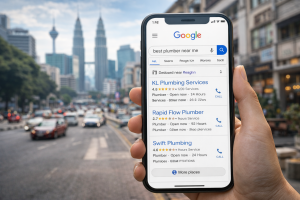
Let me paint a picture. Imagine someone in KL searching “best plumber near me” or “affordable digital marketing services in Kuala Lumpur” right now. That person is ready to buy. They’re not just browsing—they’re actively looking for someone exactly like you.

If your website shows up in that search, you win the customer. If your competitor’s site shows up instead, you lose. That’s the power of SEO for small businesses, especially in a city like Kuala Lumpur where competition is fierce.

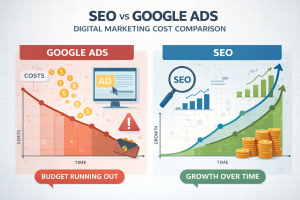
Here’s what most small business owners get wrong: they think SEO is expensive and takes forever. Sometimes it does take time, but it doesn’t have to drain your budget like traditional advertising does. Google Ads might disappear the moment you stop paying. SEO, on the other hand, keeps working for you even when you’re sleeping.


The Real Cost Difference: SEO vs. Other Marketing

Let’s be practical. Running Facebook ads costs money every single day. Google Ads stop the moment your budget runs out. But SEO? Once you build it properly, you get consistent traffic without paying for every click.

For a small business in KL with a limited budget, this matters. You might spend RM500-RM2,000 monthly on SEO work (either hiring someone or doing it yourself), and after three to six months, you’ll start seeing real results. Those results compound. A year in, you’re getting customers regularly from search—and you’re not paying per click.

Compare that to ads. Spend RM2,000 on Google Ads this month, get 50 clicks, maybe 5 sales. Stop spending, and the clicks stop immediately. The math is different, and SEO almost always wins in the long game.


How Local SEO Works for Kuala Lumpur Businesses

Here’s where SEO becomes even more valuable for you: local SEO.

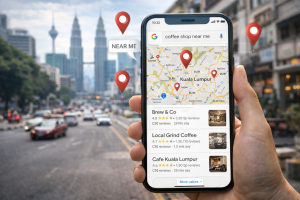
Most people searching for services in KL include location terms. They search “accountant in Bangsar,” “personal trainer near Hartamas,” or “graphic designer Kuala Lumpur.” These searches are incredibly valuable because the person is literally in your service area and ready to hire.

When you optimize your website and Google Business Profile for these local searches, you become visible exactly when people need you. Your business shows up in Google Maps, in the local pack, and in organic search results. Suddenly, your phone starts ringing with inquiries from people who actually want your services.

Small businesses in KL have a real advantage here. Large companies often try to rank nationally or internationally, spreading their efforts thin. You can dominate your local market by focusing your SEO efforts on Kuala Lumpur and surrounding areas. A good plumber in Sentosa might rank above a mediocre one in Subang just by being smarter about local SEO.


The Real Timeline: When Will You See Results?

Let’s be honest—one of the biggest reasons small business owners hesitate is that they don’t know when to expect results.

Here’s what typically happens:

Months 1–2: You’re building foundations. Your website gets better content, faster loading speed, proper structure. Search engines notice, but you won’t see huge traffic changes yet. This is normal and actually a good sign that work is happening.

Months 3–4: Traffic starts increasing noticeably. Maybe you get 20-30% more visitors. Some of these people convert to customers. You’re starting to see ROI.

Months 5–6: By now, consistency kicks in. You’re getting regular inquiries, and you notice patterns in which keywords bring the best customers.

Months 6–12: If you’ve done SEO right, you’re now getting consistent qualified leads from search. This is when SEO really pays off.

The timeline varies based on how competitive your industry is, how old your website is, and how well you execute. A service business in a less saturated market might see results faster. A highly competitive industry (like real estate) might take longer.


What Makes SEO Work for Small KL Businesses

Three things separate successful SEO for small businesses from failed attempts:

First, focus on the right keywords. Don’t chase competitive national keywords. Search for terms like “affordable [service] in Kuala Lumpur” or “best [service] near [area].” These have less competition but more intent. A person searching “best website design near Klang” is more likely to hire you than someone searching just “website design.”

Second, get your Google Business Profile right.

This is free and essential. Complete it fully with accurate address, phone number, hours, and regular updates. When someone searches your service in KL, your Google Business listing appears before your website often. Make it count.

Third, create content that actually helps people.

Write about problems your customers face. Answer their questions. A digital marketing agency in KL might write “How to Grow Your E-commerce Business: A KL Business Owner’s Guide.” This attracts people in your market and shows Google you’re relevant.


The Risk of Ignoring SEO

Here’s what worries me about small businesses skipping SEO: your competitors probably aren’t.

Right now, your competitor might be building SEO. In six months, they’ll be getting customers from Google Search while you’re still wondering why your phone isn’t ringing. If you wait another six months to start, you’re a year behind.

Plus, doing nothing means paying more for other marketing later. If SEO isn’t bringing customers, you’ll spend more on ads. That’s the expensive route.


Should You Do It Yourself or Hire Someone?

This depends on your situation. If you have time and want to learn, you can start basic SEO yourself—updating your Google Business Profile, writing keyword-focused content, improving page speed. There are plenty of free resources.

But here’s the reality: if your time is worth money (and for a business owner, it always is), paying someone is usually smarter. You might spend RM1,000–RM2,000 monthly for a competent SEO person or agency in KL. That’s often worth it if it brings you just two extra clients monthly worth RM5,000 each.


The Honest Bottom Line

Is SEO worth it for small businesses in Kuala Lumpur? Absolutely—if you do it right and stay patient.

You don’t need to be a big company to win at SEO. In fact, small businesses often have an advantage: you can focus locally, build genuine connections, and rank faster in your market. The investment is smaller than many think, the timeline is realistic, and the payoff compounds over time.

Start today. Focus on local keywords, fix your Google Business Profile, and create helpful content. In three to six months, you’ll understand why nearly every successful small business in KL takes SEO seriously.

Your future customers are searching right now. Make sure they find you.

1 2 3 6